lock TESLA MODEL S 2018 Owner's Manual
[x] Cancel search | Manufacturer: TESLA, Model Year: 2018, Model line: MODEL S, Model: TESLA MODEL S 2018Pages: 195, PDF Size: 5.51 MB
Page 5 of 195
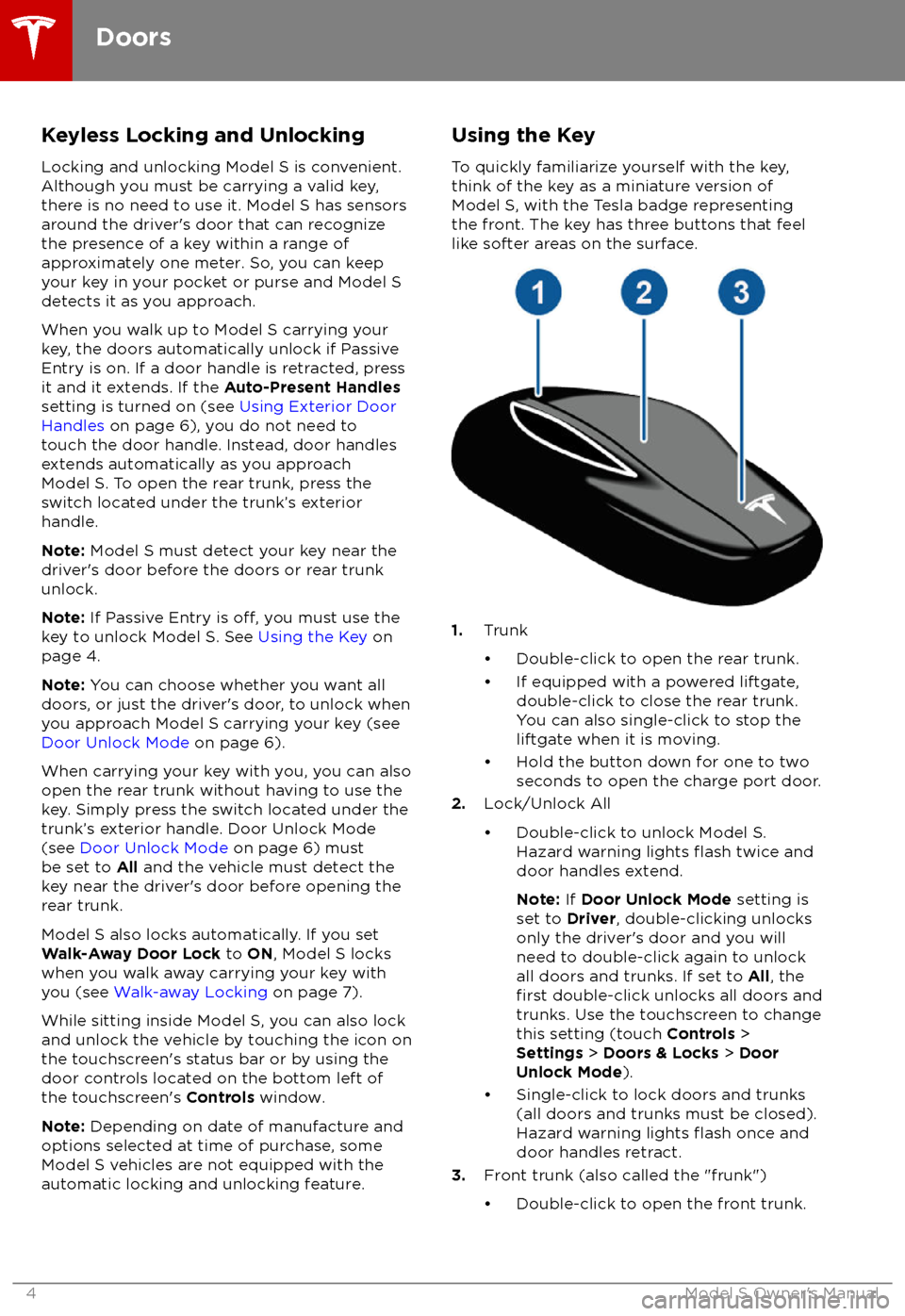
Keyless Locking and Unlocking
Locking and unlocking Model S is convenient.
Although you must be carrying a valid key,
there is no need to use it. Model S has sensors
around the driver
Page 8 of 195
Child-protection LockModel S has child-protection locks on the rear
doors and liftgate to prevent them from being
opened using interior handles. Use the
touchscreen to turn child protection locks on
or
off. Touch Controls > Settings > Doors &
Locks > CHILD-PROTECTION LOCK .
Note: It is recommended that you turn child-
protection locks on whenever children are
seated in the rear seats.
Drive-away Locking Model S automatically locks all doors
(including the trunks) whenever your driving
speed exceeds 8 km/h.
Walk-away Locking
Doors and trunks can automatically lock whenever you walk away carrying the key.
To turn this feature on or
off, touch Controls >
Settings > Doors & Locks > WALK-AWAY
DOOR LOCK .
Note: Depending on date of manufacture and
options selected at time of purchase, some Model S vehicles are not equipped with the
Walk-way Door Lock feature.
Note: If all doors are closed and you use the
key to unlock Model S, walk-away locking is
temporarily suspended for one minute. If you
open a door within this minute, it does not re-
lock until after all the doors are closed and
you have walked away with the key.
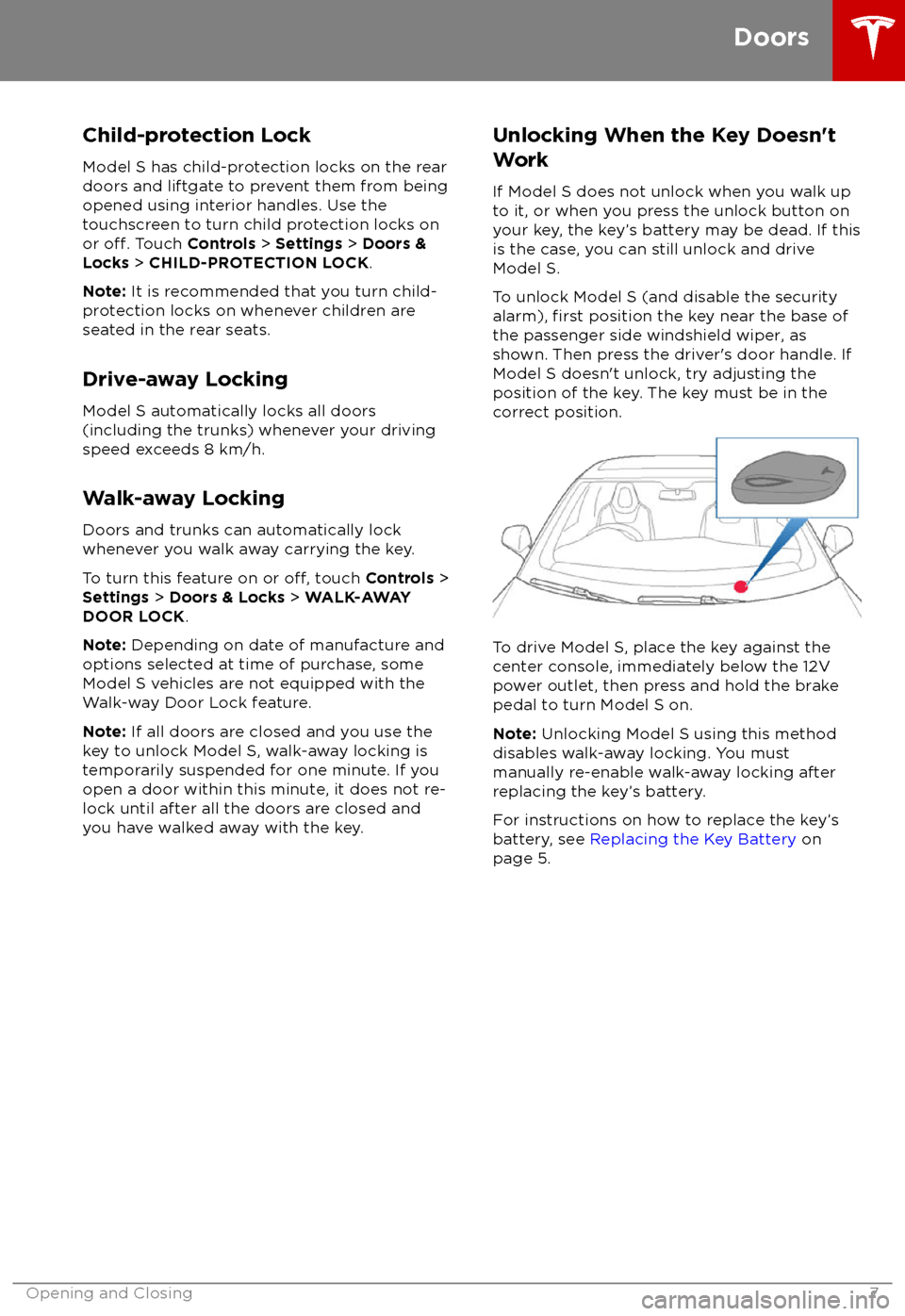
Unlocking When the Key Doesn
Page 12 of 195
2.Press and hold the button on the
underside of the liftgate for two seconds
until you hear a
confirmation chime.
3.Confirm that you have set it to the desired
height by closing the liftgate, then
reopening it.
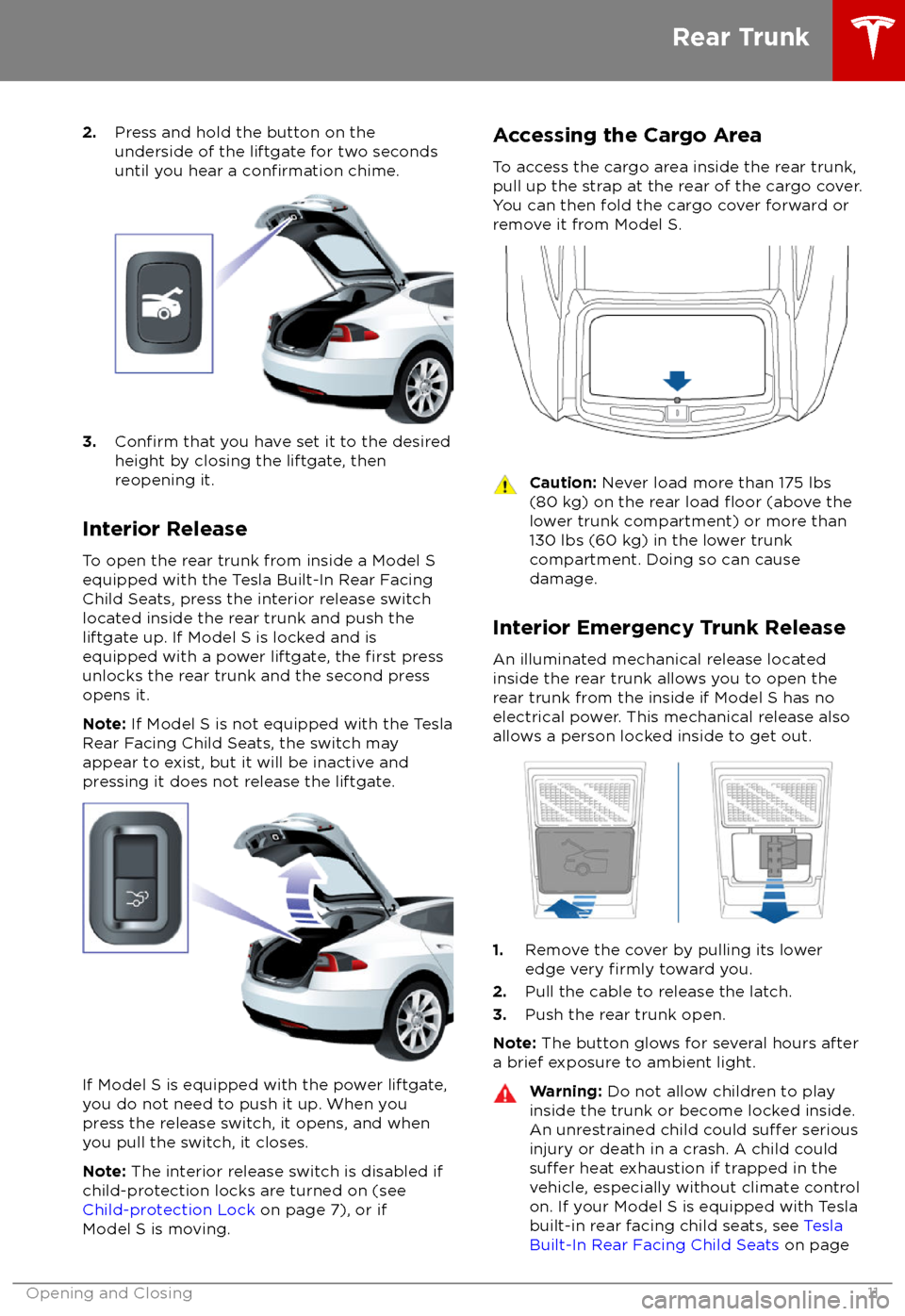
Interior Release To open the rear trunk from inside a Model S
equipped with the Tesla Built-In Rear Facing
Child Seats, press the interior release switch
located inside the rear trunk and push the liftgate up. If Model S is locked and is
equipped with a power liftgate, the
first press
unlocks the rear trunk and the second press
opens it.
Note: If Model S is not equipped with the Tesla
Rear Facing Child Seats, the switch may
appear to exist, but it will be inactive and
pressing it does not release the liftgate.
If Model S is equipped with the power liftgate,
you do not need to push it up. When you
press the release switch, it opens, and when you pull the switch, it closes.
Note: The interior release switch is disabled if
child-protection locks are turned on (see
Child-protection Lock on page 7), or if
Model S is moving.
Accessing the Cargo Area
To access the cargo area inside the rear trunk,
pull up the strap at the rear of the cargo cover.
You can then fold the cargo cover forward or
remove it from Model S.Caution: Never load more than 175 lbs
(80 kg) on the rear load floor (above the
lower trunk compartment) or more than
130 lbs (60 kg) in the lower trunk
compartment. Doing so can cause
damage.
Interior Emergency Trunk Release
An illuminated mechanical release located
inside the rear trunk allows you to open the
rear trunk from the inside if Model S has no
electrical power. This mechanical release also
allows a person locked inside to get out.
1. Remove the cover by pulling its lower
edge very firmly toward you.
2. Pull the cable to release the latch.
3. Push the rear trunk open.
Note: The button glows for several hours after
a brief exposure to ambient light.
Warning: Do not allow children to play
inside the trunk or become locked inside.
An unrestrained child could
suffer serious
injury or death in a crash. A child could
suffer heat exhaustion if trapped in the
vehicle, especially without climate control
on. If your Model S is equipped with Tesla
built-in rear facing child seats, see Tesla
Built-In Rear Facing Child Seats on page
Rear Trunk
Opening and Closing11
Page 14 of 195
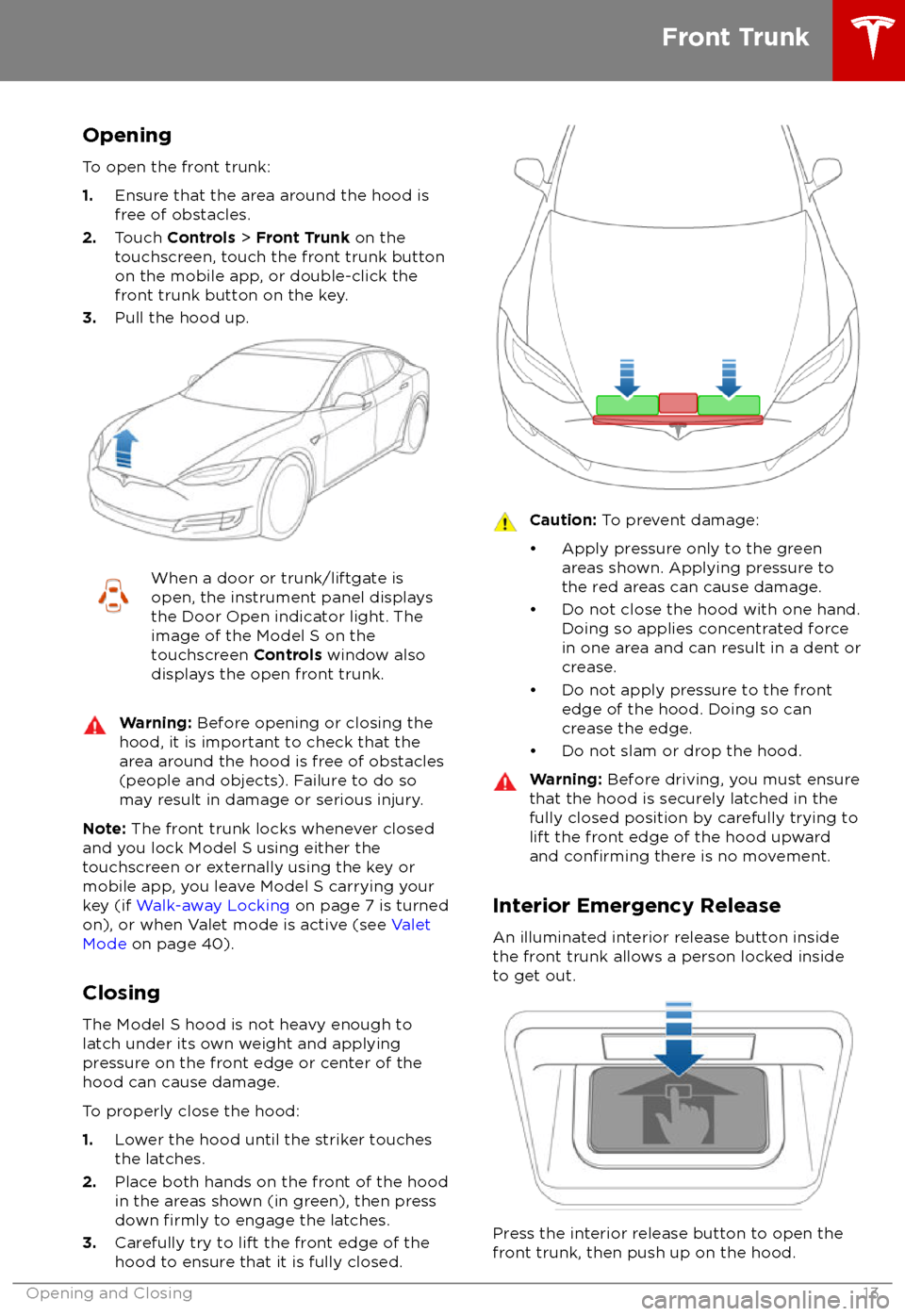
Opening
To open the front trunk:
1. Ensure that the area around the hood is
free of obstacles.
2. Touch Controls > Front Trunk on the
touchscreen, touch the front trunk button
on the mobile app, or double-click the front trunk button on the key.
3. Pull the hood up.When a door or trunk/liftgate is
open, the instrument panel displays
the Door Open indicator light. The
image of the Model S on the
touchscreen Controls window also
displays the open front trunk.Warning: Before opening or closing the
hood, it is important to check that the area around the hood is free of obstacles
(people and objects). Failure to do so
may result in damage or serious injury.
Note: The front trunk locks whenever closed
and you lock Model S using either the
touchscreen or externally using the key or
mobile app, you leave Model S carrying your key (if Walk-away Locking on page 7 is turned
on), or when Valet mode is active (see Valet
Mode on page 40).
Closing The Model S hood is not heavy enough to
latch under its own weight and applying
pressure on the front edge or center of the
hood can cause damage.
To properly close the hood:
1. Lower the hood until the striker touches
the latches.
2. Place both hands on the front of the hood
in the areas shown (in green), then press
down
firmly to engage the latches.
3. Carefully try to lift the front edge of the
hood to ensure that it is fully closed.
Caution: To prevent damage:
Page 16 of 195

Opening and Closing
To open the glove box, press the switch located on the side of the touchscreen. If you
leave the glove box open for
five minutes, its
light automatically turns off.
Note: The glove box locks whenever Model S
is locked externally, using the key or walk- away locking. It also locks when Model S is inValet mode (see Valet Mode on page 40). It
does not lock when Model S is locked using the touchscreen.
Warning: When driving, keep the glove
box closed to prevent injury to a
passenger if a collision or sudden stop occurs.
Glove Box
Opening and Closing15
Page 20 of 195

Warning: Riding in a moving vehicle with
the seat back reclined can result in
serious injuries in a collision, as you could slide under the lap belt or be propelled
into the seat belt. Ensure your seat back
is reclined no more than 30 degrees when
the vehicle is moving.
Folding Rear Seats
Model S has a split rear seat that can fold
forward.
Note: If Model S is equipped with the optional
executive rear seats, these seats do not fold
forward.
Before folding, remove items from the seats
and the rear footwell. To allow the rear seat
backs to fold completely
flat, you may need to
move the front seats forward.
To fold a rear seat, pull the corresponding
lever and fold the seat forward.
Raising Rear Seats
Before raising a rear seat, make sure that the
seat belts are not trapped behind the backrest.
Pull the seat back upward until it locks into
place.
To
confirm that the seat back is locked in the
upright position, try pulling it forward.
Warning: Always ensure the seat backs
are locked in their upright position.
Failure to do so increases the risk of injury.
Head Supports/Restraints
If your Model S is equipped with adjustable
head supports, use the round button on the seat to move the headrest up/down. The same
button is used to adjust the seat
Page 22 of 195

Wearing Seat BeltsUsing seat belts and child safety seats is the
most
effective way to protect occupants if a
collision occurs. Therefore, wearing a seat belt is required by law in most jurisdictions.
Both the driver and passenger seats are
equipped with three-point inertia reel seat
belts. Inertia reel belts are automatically
tensioned to allow occupants to move
comfortably during normal driving conditions.
To securely hold child safety seats, all
passenger seating positions are equipped with
an automatic locking retractor (ALR) that, by
pulling the seat belt beyond the length
needed for a typical adult occupant, locks the
belt into place until the seat belt is unbuckled
(see Installing Seat Belt Retained Child Seats
on page 27).
The seat belt reel automatically locks to
prevent movement of occupants if Model S experiences a force associated with hardacceleration, braking, cornering, or an impact
in a collision.
The seat belt reminder on the
instrument panel alerts you if a seat
belt for an occupied seat is not
fastened. If the belt remains unfastened, the reminder
flashes and
an intermittent chime sounds. If all
occupants are buckled up and the
reminder stays on, re-fasten seat
belts to ensure they are correctly
latched. Also remove any heavy
objects (such as a briefcase) from an
unoccupied seat. If the reminder
light continues to stay on, contact
Tesla.
To Fasten a Belt
1. Ensure correct positioning of the seat (see
Correct Driving Position on page 18).
2. Draw the belt out smoothly, ensuring the
belt lays
flat across the pelvis, chest and
mid-point of your collar bone, between
the neck and shoulder.
3. Insert the latch plate into the buckle and
press together until you hear a click
indicating it is locked in place.
4. Pull the belt to check that it is securely
fastened.
5. Pull the diagonal part of the belt toward
the reel to remove excess slack.
To Release a Belt
Hold the belt near the buckle to prevent the
belt from retracting too quickly, then press the
button on the buckle. The belt retracts
automatically. Ensure there is no obstruction
that prevents the belt from fully retracting.
The belt should not hang loose. If a seat belt does not fully retract, contact Tesla.
Wearing Seat Belts When Pregnant Do not put the lap or shoulder sections of the
seat belt over the abdominal area. Wear the lap section of the belt as low as possible
across the hips, not the waist. Position the
shoulder portion of the belt between the
breasts and to the side of the abdomen. Consult your doctor for
specific guidance.
Seat Belts
Seating and Safety Restraints21
Page 33 of 195

5.Raise the seat back to the upright position
and push until it locks into position. Visually check to ensure that the retaining
catches are engaged.
6. Check that the seat back and seat base
are securely retained in the upright
position by trying to pull the seat back
toward you.
Folding
Caution: Before folding the seats, fasten
the seat belts to prevent them from
getting trapped in the seat mechanism
and being damaged.
1. Pull the handle to release the seat back
and pull the seat back fully forward.
2. Push the lever to release the head
supports from the seat back, then fold
back onto the seat.
3. Secure the Velcro strap.
4.Pull the strap at the rear of the seat to fold
the seat assembly into the trunk floor.
5. Replace the cover on the trunk floor.
Seating a Child
The Tesla built-in rear facing child seats are
child restraint systems and are approved to
United Nations ECE Regulation R44.04
standards for use by children in Mass Groups II
and III, weighing 15 - 36 kg. These seats must
only be used for children who are between 3
and 12 years old, and 98 - 135 cm tall.
Tesla Built-In Rear Facing Child Seats
32Model S Owner
Page 46 of 195
StartingWhen you open a door, Model S powers on
the instrument panel and touchscreen and you
can operate all controls.
To drive Model S:
1. PRESS THE BRAKE PEDAL - Model S
powers on and is ready to drive.
2. SELECT A GEAR - Move the gear lever all
the way down for Drive and all the way up
for Reverse. See Shifting Gears on page
46.
Note: If Passive Entry is
off and you do not
press the brake pedal to start Model S within
approximately
five minutes, a message
displays on the instrument panel and you must use the key to lock then unlock Model S againbefore starting the vehicle.
Everything you need to know when driving
Model S displays on the instrument panel.
Key Not Inside
If Model S does not detect a key when you
press the brake, the instrument panel displays a message telling you that a key is not inside.
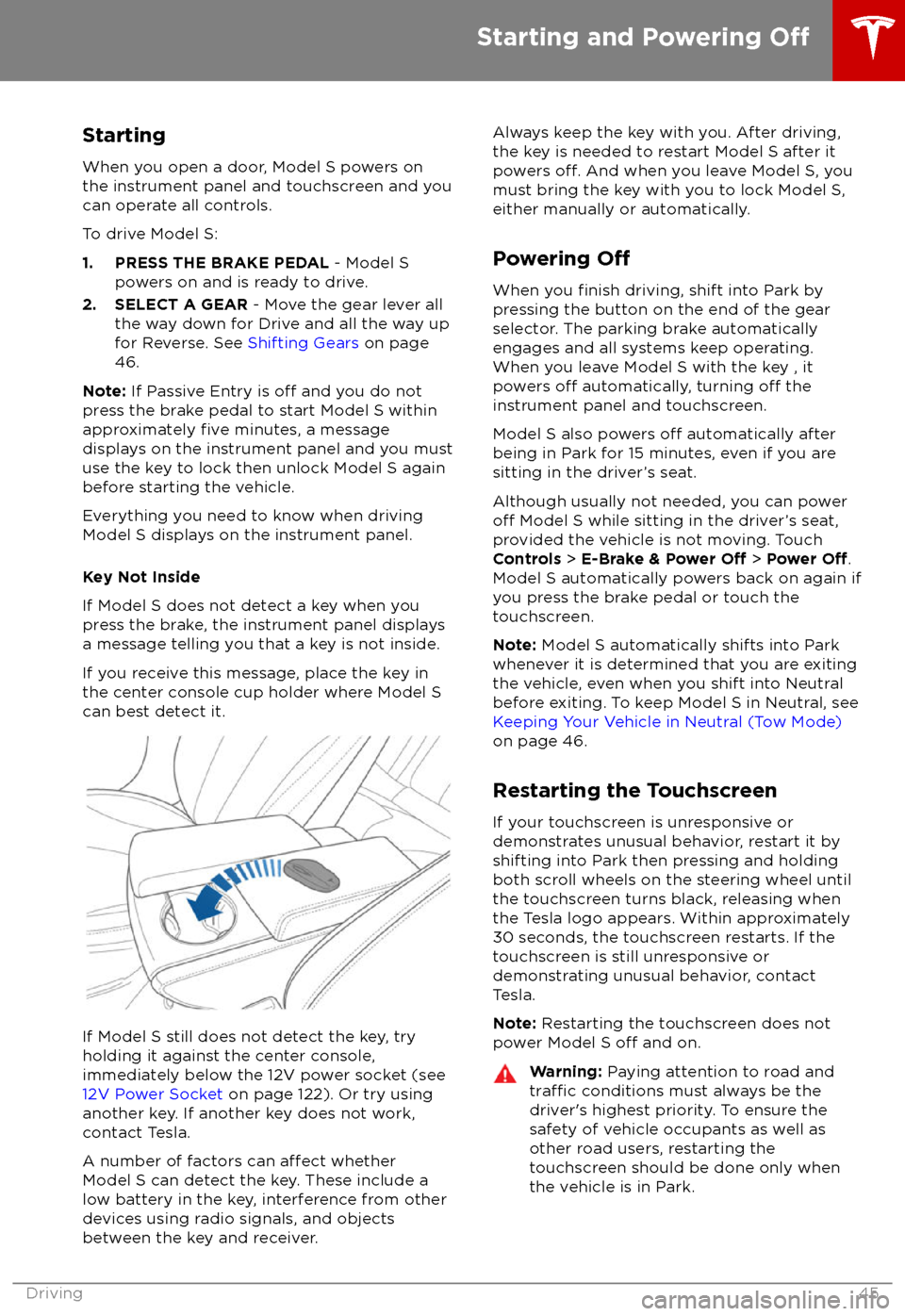
If you receive this message, place the key in
the center console cup holder where Model S can best detect it.
If Model S still does not detect the key, try
holding it against the center console,
immediately below the 12V power socket (see
12V Power Socket on page 122). Or try using
another key. If another key does not work, contact Tesla.
A number of factors can
affect whether
Model S can detect the key. These include a
low battery in the key, interference from other
devices using radio signals, and objects
between the key and receiver.
Always keep the key with you. After driving,
the key is needed to restart Model S after it powers
off. And when you leave Model S, you
must bring the key with you to lock Model S, either manually or automatically.
Powering
Off
When you finish driving, shift into Park by
pressing the button on the end of the gear
selector. The parking brake automatically
engages and all systems keep operating.
When you leave Model S with the key , it
powers
off automatically, turning off the
instrument panel and touchscreen.
Model S also powers
off automatically after
being in Park for 15 minutes, even if you are
sitting in the driver
Page 49 of 195
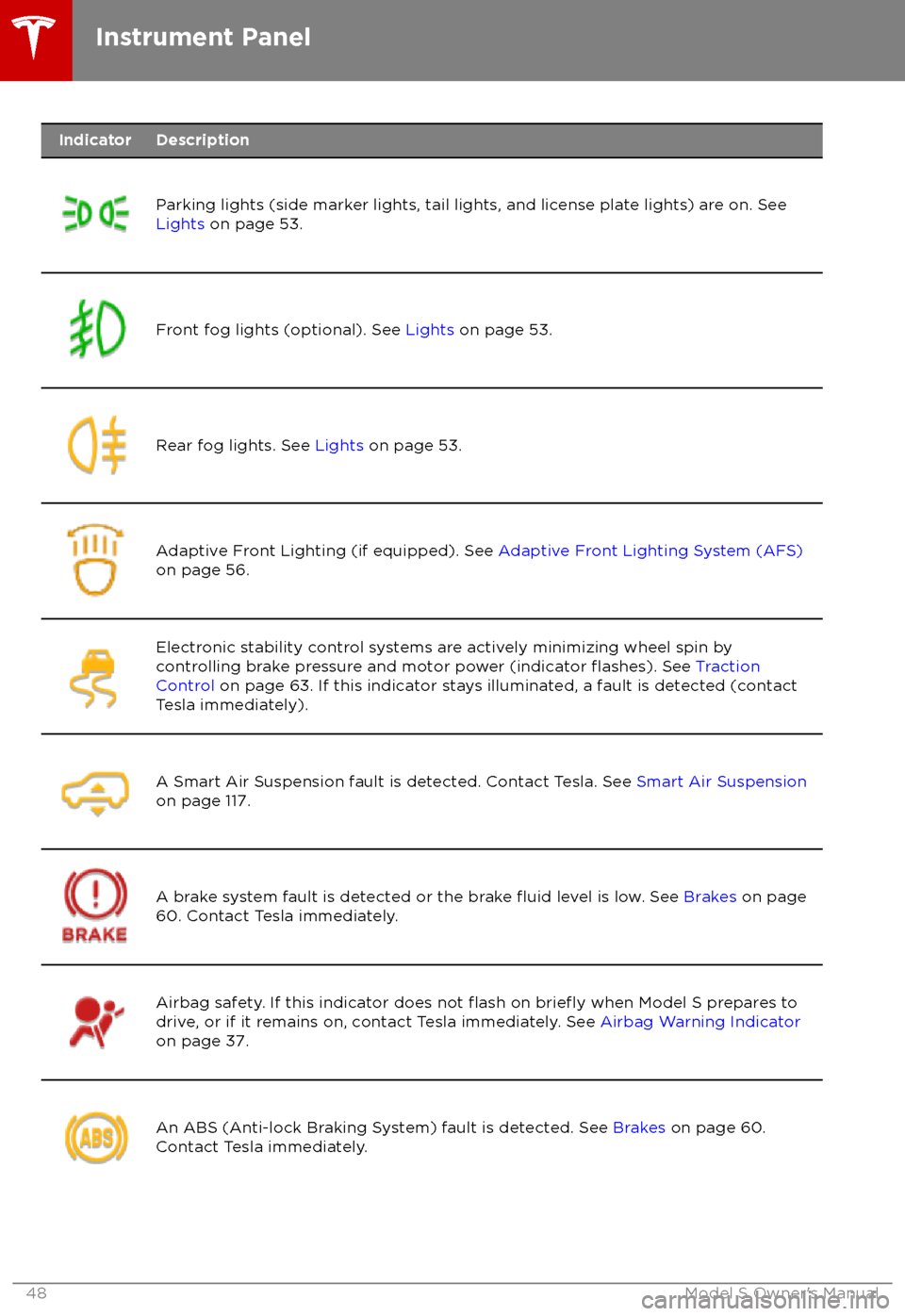
IndicatorDescription
Parking lights (side marker lights, tail lights, and license plate lights) are on. See
Lights on page 53.Front fog lights (optional). See Lights on page 53.Rear fog lights. See Lights on page 53.Adaptive Front Lighting (if equipped). See Adaptive Front Lighting System (AFS)
on page 56.Electronic stability control systems are actively minimizing wheel spin by
controlling brake pressure and motor power (indicator flashes). See Traction
Control on page 63. If this indicator stays illuminated, a fault is detected (contact
Tesla immediately).A Smart Air Suspension fault is detected. Contact Tesla. See Smart Air Suspension
on page 117.A brake system fault is detected or the brake fluid level is low. See Brakes on page
60. Contact Tesla immediately.Airbag safety. If this indicator does not flash on briefly when Model S prepares to
drive, or if it remains on, contact Tesla immediately. See Airbag Warning Indicator
on page 37.An ABS (Anti-lock Braking System) fault is detected. See Brakes on page 60.
Contact Tesla immediately.Instrument Panel
48Model S Owner